
How to Connect Your Domain to WebMarlin
Learn how to connect a custom domain you already own — such as GoDaddy, Namecheap, Cloudflare, or Google Domains / Squarespace — to your WebMarlin site. Setup takes under 5 minutes, and SSL is provisioned automatically.
The DNS Records to Add
Copy these exact values into your domain registrar's DNS zone editor
4 Steps from Start to Live
The exact process for connecting your domain in minutes
Add Domain in WebMarlin
1 minute
Log in to your WebMarlin dashboard, select your site, go to Settings → Domains, click Connect Custom Domain, and enter your domain name (e.g.
www.yourdomain.com).Open Your Registrar DNS
1-2 minutes
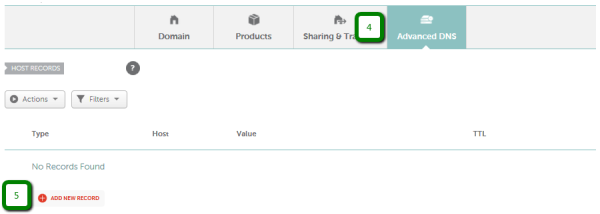
Log in to your domain provider (Namecheap, GoDaddy, Cloudflare, Google Domains, etc.), open your domain list, and navigate to DNS Management, DNS Zone, or Advanced DNS.
Add CNAME & Remove Conflicts
2 minutes
Add a new CNAME record with Host:
wwwand Target:sites.webmarlin.com. Make sure to delete any pre-existing default parking A records or conflicting redirects for the same host.Verify & SSL Auto-Provision
15 to 60 minutes
Save your changes. Once DNS propagation completes, WebMarlin automatically generates and activates a free Let's Encrypt SSL certificate. Your site is now live on HTTPS!
Registrar DNS Dashboards & Screenshots
Follow the specific walkthrough for your domain registrar


DNS Troubleshooting & Questions
Help with propagation delays, error messages, and verification
Adding the DNS record in your registrar takes about 2 minutes. Once saved, DNS propagation across worldwide nameservers typically takes between 15 to 60 minutes. In rare cases, registrar caches may take up to 24 to 48 hours to fully refresh.
DNS rules forbid having two records for the exact same hostname. If your registrar displays an error when adding the CNAME, check your existing records for any default 'parking' A record or URL redirect targeting www or @. Delete the old record first, then save the WebMarlin CNAME record.
No. You keep your domain registered with your existing provider (GoDaddy, Namecheap, Google Domains, etc.). You continue paying domain renewals to your registrar as usual. You only point the DNS records to WebMarlin.
WebMarlin provisions a free, trusted Let's Encrypt SSL certificate completely automatically as soon as your DNS records resolve to WebMarlin's edge network. It auto-renews before expiration with zero maintenance required.
The standard DNS specification does not allow CNAME on the root domain. The best practice is to point www via CNAME to sites.webmarlin.com, and configure your registrar's free Domain Forwarding feature to redirect yourdomain.com to https://www.yourdomain.com (301 Permanent Redirect).
Yes! You can use public lookup tools like DNSChecker.org or run dig www.yourdomain.com CNAME in your terminal to see if your record resolves to sites.webmarlin.com worldwide.
Still Need Help Connecting?
Send us your domain name and registrar — our team will check your DNS settings.
WebMarlin Technical Support
If you encounter difficulties with your registrar's dashboard, reach out to our team at support@webmarlin.com with your domain name and registrar details.
We will verify your DNS propagation and confirm your SSL provisioning.